- Объём
- 438 страниц
- Формат
- PDF · 19 МБ
- Раздел
- ПЛК
- Скачиваний
- 7
Скачать бесплатнонужна регистрация — минута через VK ID или Яндекс ID
Загляните внутрь — первые страницы
Дальше — в файле (438 стр.). Скачать целиком бесплатно
OPTO22 PAC Control — софт контроллер
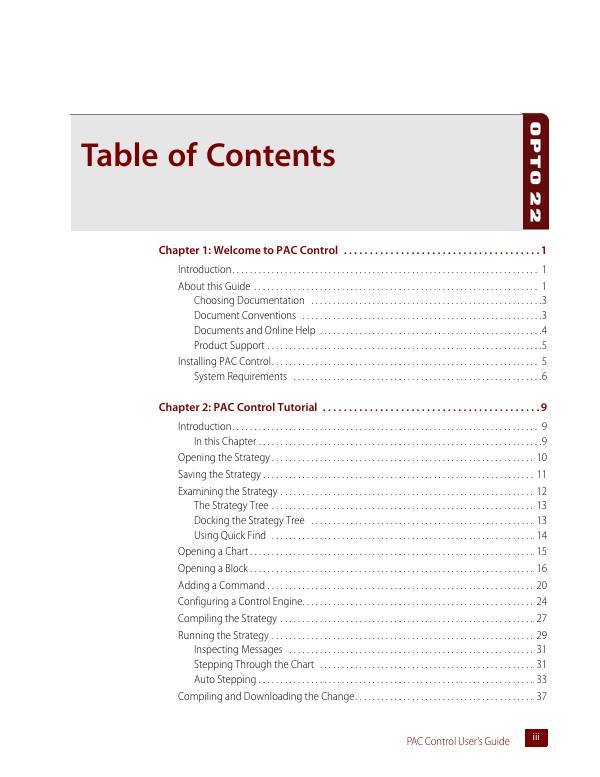
Оглавление
- Table of Contents3
- 1: Welcome to PAC Control15
- Introduction15
- About this Guide15
- Installing PAC Control19
- 2: PAC Control Tutorial23
- Introduction23
- Opening the Strategy24
- Saving the Strategy25
- Examining the Strategy26
- Opening a Chart29
- Opening a Block30
- Adding a Command34
- Configuring a Control Engine38
- Compiling the Strategy41
- Running the Strategy43
- Compiling and Downloading the Change51
- Using a Watch Window53
- Closing the Strategy and Exiting60
- What’s Next?60
- 3: What Is PAC Control?61
- Introduction61
- About PAC Control61
- General Control Concepts63
- Key Features64
- PAC Control Terminology65
- PAC Control Main Window70
- Windows and Dialog Boxes in PAC Control75
- Customizing PAC Control for Your Needs83
- Keyboard and Mouse Shortcuts85
- Online Help86
- 4: Designing Your Strategy87
- Introduction87
- Steps to Design87
- Basic Rules95
- Instruction Examples98
- Optimizing Throughput109
- 5: Working with Control Engines111
- Introduction111
- Configuring Control Engines111
- Using Network Segmenting in PAC Control115
- Using Ethernet Link Redundancy in PAC Control116
- Using Redundant Controllers121
- Changing or Deleting a Control Engine121
- Inspecting Control Engines and the Queue123
- Downloading Files to the Control Engine128
- 6: Working with I/O133
- Introduction133
- Choosing a Configuration Tool133
- Adding an I/O Unit136
- Adding I/O Points142
- Configuring a Serial Module151
- Changing Point Configuration151
- Configuring PID Loops155
- Inspecting I/O in Debug Mode162
- Inspecting and Tuning PID Loops167
- Using Watch Windows for Monitoring179
- 7: Working with Strategies183
- Introduction183
- Creating a New Strategy183
- Opening a Strategy184
- Saving and Closing185
- Saving a Strategy to Flash187
- Archiving Strategies188
- Compiling and Downloading189
- Running a Strategy Manually198
- Running a Strategy Automatically (Autorun)198
- Stopping a Strategy199
- Debugging199
- Viewing and Printing206
- Searching and Replacing217
- Legacy Options221
- 8: Working with Flowcharts225
- Introduction225
- Creating a New Chart225
- Working with Chart Elements227
- Opening, Saving, and Closing Charts238
- Copying, Renaming, and Deleting Charts239
- Printing Charts240
- Exporting and Importing Charts241
Файлы
- 🔒 1700_PAC_Control_Users_GuidePDF 19 МБ
Скачивание доступно зарегистрированным участникам сообщества. Войти или зарегистрироваться Вход через VK ID или Яндекс ID занимает минуту.