- Объём
- 235 страниц
- Формат
- PDF · 7 МБ · 2 файла
- Раздел
- ПЛК
- Скачиваний
- 16
Скачать бесплатнонужна регистрация — минута через VK ID или Яндекс ID
Загляните внутрь — первые страницы
Дальше — в файле (235 стр.). Скачать целиком бесплатно
Описание сигнальных модулей и общий каталог устройств для платформы x80.
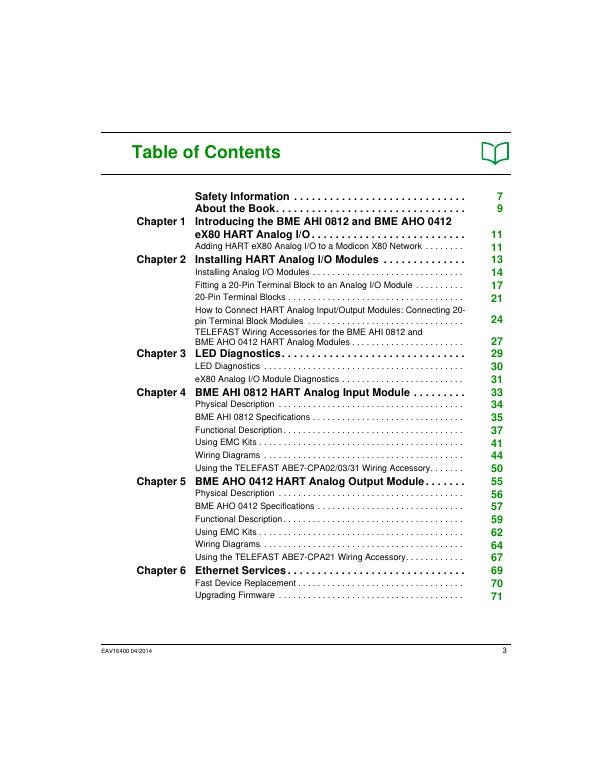
Оглавление
- Modicon eX801
- Table of Contents3
- Safety Information7
- About the Book9
- Introducing the BME AHI 0812 and BME AHO 0412 eX80 HART Analog I/O11
- Adding HART eX80 Analog I/O to a Modicon X80 Network11
- Installing HART Analog I/O Modules13
- Installing Analog I/O Modules14
- Fitting a 20-Pin Terminal Block to an Analog I/O Module17
- 20-Pin Terminal Blocks21
- How to Connect HART Analog Input/Output Modules: Connecting 20-pin Terminal Block Modules24
- TELEFAST Wiring Accessories for the BME AHI 0812 and BME AHO 0412 HART Analog Modules27
- LED Diagnostics29
- LED Diagnostics30
- eX80 Analog I/O Module Diagnostics31
- BME AHI 0812 HART Analog Input Module33
- Physical Description34
- BME AHI 0812 Specifications35
- Functional Description37
- Using EMC Kits41
- Wiring Diagrams44
- Using the TELEFAST ABE7-CPA02/03/31 Wiring Accessory50
- BME AHO 0412 HART Analog Output Module55
- Physical Description56
- BME AHO 0412 Specifications57
- Functional Description59
- Using EMC Kits62
- Wiring Diagrams64
- Using the TELEFAST ABE7-CPA21 Wiring Accessory67
- Ethernet Services69
- Fast Device Replacement70
- Upgrading Firmware71
- Introducing HART75
- Introducing the HART Multiplexer76
- Explicit Messaging Using the DATA_EXCH Block83
- Configuring BME AHI 0812 and BME AHO 0412 Modules in Unity Pro91
- Adding and Configuring HART Analog I/O92
- Configuring X80 Analog Device DDT Parameters101
- Configuring BME AHI 0812 and BME AHO 0412 DTMs105
- Adding a Module DTM106
- Configuring the Module IP Address110
- Configuring the Module DTM115
- Completing the Project Configuration141
- Working with Field Instrument Management Tools151
- Analog Module Debugging157
- Introducing the Debug Function of an Analog Module158
- Description of the Analog Module Debug Screen159
- Selecting the Adjustment Values for the Input Channels and Measurement Forcing161
- Modification of Output Channels Adjustment Values163
- Analog Module Diagnostics165
- Diagnostics of an Analog Module166
- Detailed Diagnostics by Analog Channel168
- IODDTs and Device DDTs169
- Detailed Description of T_ANA_IN_BMX-type IODDT Objects170
- Detailed Description of T_ANA_OUT_BMX-type IODDT Objects173
- Detailed Description of T_ANA_IN_GEN-type IODDT Objects176
- Detailed Description of T_ANA_OUT_GEN-type IODDT Objects177
- Details of the Language Objects of the IODDT of Type T_GEN_MOD178
- Analog Device DDT179
- Analog Device Ethernet Remote I/O Forcing Mode186
- Description of HART DDT Objects188
- Operating Modules from the Application189
- Access to the Measurements and Statuses190
- Additional Programming Features197
- Appendices211
- Topological/State RAM Addressing of the Modules213
- EtherNet/IP Communication Codes215
- Glossary225
- Index233
Файлы
- 🔒 Modicon-eX80-BME-AHI-0812-HART-Analog-Input-Module-BME-AHO-0412-HART-Analog-Output-Module-User-GuidePDF 7 МБ
- 🔒 Modicon-X80-IO-platform-Catalog-January-2015PDF 13 МБ
Скачивание доступно зарегистрированным участникам сообщества. Войти или зарегистрироваться Вход через VK ID или Яндекс ID занимает минуту.